A practical guide to cloud migration
Explore the secrets of a successful cloud migration with insights and real-life examples to maximize performance and increase your business potential.

The state of cloud adoption is growing, and Gartner predicts that by 2026, 75% of organizations will have a transformation model predicated on cloud as the fundamental underlying platform. Cloud deployments can include public, private and hosted private solutions, but for those who have already begun their cloud migration, the majority of the implementations are hybrid or multicloud users.
This trend toward the adoption of cloud-native software and platform as a service (PaaS) is expected to increase as organizations continue to evaluate different cloud solutions. Indeed, 74% of U.S. infrastructure decision-makers say their firms are adopting containers with a PaaS in an on-premises or public cloud environment.
With more opportunities than ever to migrate critical enterprise data to the cloud, it’s important to have a full understanding of what it entails.

Forrester Study: The Rise of Content Intelligence – A New Era of Innovation in ECM Insights from the 6th Annual Content Services Pulse Study, 2025 Edition
Explore how modern content services platforms unlock content intelligence to streamline workflows, strengthen governance and drive better business outcomes. Get practical insights on AI readiness, content intelligence adoption and workforce transition strategies.
What is cloud migration?
Cloud migration is the transfer of data, processes and applications from one existing datacenter to a cloud-based datacenter. This transfer could originate from a different cloud or an on-premises solution, but its destination is always a cloud environment.
Cloud migration usually involves moving to a cloud-computing infrastructure environment in one of these three categories:
Infrastructure-as-a-Service (IaaS), such as Amazon’s AWS environment.
Platform-as-a-Service (PaaS), such as the Salesforce platform or Hyland’s Alfresco digital business platform-as-a-service, which makes advanced content management capabilities available to any enterprise application through open APIs.
Software-as-a-Service (SaaS), such as DocuSign or Hyland’s OnBase in the Hyland Cloud, which manages and scales your solution automatically.

Private university achieves 114% ROI with Hyland Cloud Nucleus Research studies the impact of Hyland Cloud
Discover how a leading private university revolutionized its operations with Hyland Cloud, achieving an impressive 114% return on investment in just over a year. The institution saved $275,000 annually, streamlined processes and embraced a digital-first approach. Explore this success story to see how innovation drove measurable outcomes and transformed higher education.
The 8 different types of cloud migration
As businesses embrace the cloud to harness its scalability, flexibility and cost efficiencies, they are faced with the challenge of choosing the most effective migration strategy.
For organizations to make informed decisions, they must understand the eight different types of cloud migration:
1. Rehosting (lift and shift)
Rehosting is usually the fastest way to migrate to the cloud as it involves minimal changes to applications. Organizations replicate their existing infrastructure in the cloud by converting physical servers to virtual machines from on-premises datacenters to cloud environments.
While rehosting offers quicker migration and less disruption to operations, it does not fully exploit the benefits of cloud-native services or optimize costs.
2. Refactoring or re-architecting
Refactoring involves modifying applications to take advantage of cloud-native features and services. This includes breaking down single-piece applications into microservices, adopting serverless computing or using managed databases and storage solutions.
While refactoring requires more time, resources and expertise than rehosting, it leads to significant improvements in scalability, performance and cost efficiency in the long term.
3. Replatforming (lift, tinker and shift)
Replatforming strikes a balance between rehosting and refactoring by making targeted optimizations to applications before migrating them to the cloud. Organizations may update certain components to better align with the target cloud platform's capabilities without redesigning the entire application.
This aims to achieve some benefits of cloud-native architecture while reducing the effort and risk compared of full refactoring.
4. Repurchasing (drop and shop)
Repurchasing is the replacing of existing on-premises software with cloud-based alternatives, typically in the form of SaaS. Instead of migrating existing applications, organizations adopt new cloud-native software that offers similar functionality.
This simplifies management, reduces infrastructure overhead and provides access to the latest features. However, it requires adjusting business processes and data migration.
5. Retire
Retiring involves identifying and decommissioning applications or services that are no longer necessary or relevant to the organization. Instead of migrating these redundant systems to the cloud, organizations choose to phase them out entirely.
Retiring legacy applications can streamline the migration process, reduce complexity and lower costs by eliminating unnecessary infrastructure and maintenance overhead.
6. Retain or revisit
Retaining keeps applications on-premises rather than migrating them to the cloud immediately. Organizations may choose to retain workloads due to regulatory requirements, data sensitivity or other considerations that make cloud migration impractical at the time.
They can revisit these decisions in the future as needed — as cloud technology evolves, business needs change or regulatory constraints ease.
7. Hybrid
Hybrid migration combines on-premises, private cloud and public cloud environments to meet the organization's requirements. This approach is useful when there is a need to retain workloads on-premises while migrating others to the cloud.
It allows organizations to leverage the benefits of both environments — the scalability, flexibility and security of the cloud — and the control over sensitive data or legacy systems of on-premises applications.
8. Application migration
Application migration to the cloud is a more specific concept than just cloud migration. It moves a software application and all of its data and processes to a new cloud computing environment, usually from a legacy on-premises server.
The main benefit of this approach is that the ROI of cloud computing can quickly outstrip the hard and soft costs of operating on-premises.
7 benefits of cloud migration
From ROI to total-cost-of-ownership (TCO), migrating to the cloud and investing in future cloud computing infrastructure has proven to save organizations time and money, as well as to create a stronger IT team by allowing them to focus on what they do best (which may not be managing complex cloud infrastructure).
The benefits of cloud migration include:
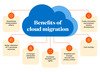
1. Streamlined modernization efforts
Keeping on-premises hardware up-to-date is time-consuming and expensive, and adding or modifying solutions in it can take a long time and demand immense IT resources.
Organizations must be able to adapt new and existing business solutions quickly and easily across their enterprise. The best way to do that is to migrate to the cloud.
2. Better utilization of IT personnel resources
The highly fluid demands of business and a growing diversity of technologies can overwhelm teams of internal experts, leaving businesses under-supported. In addition, the current job market is challenging due to fewer on-premise experts and those who may have the experience can be hard to find, expensive and difficult to retain.
By migrating to the cloud and leveraging a leading cloud provider, IT teams can focus on their own expertise and support their business operations rather than expend precious time and knowledge learning and operating cloud infrastructure.
When migrating to a cloud powered by AWS, for example, organizations gain the robustness of AWS infrastructure as well as the specialized workforce it takes to properly capitalize on it.
3. A stronger distributed workforce
Embracing a decentralized work environment has proven critical for keeping and hiring employees. Consider how migrating to a secure cloud solution helps maintain the tools for enterprise-wide connectivity by providing:
Access to corporate networks, content and processes
Secure sharing tools for even sensitive corporate information
Virtual hiring, onboarding and HR processes
Cloud-based, real-time communication platforms
4. Increased flexibility and agility
With more digitalization comes more data, and it needs somewhere to live and expand.
Leading cloud providers offer essentially exponential growth opportunities, from storage space to additional servers for supporting growth in application, web or processing. This means that worrying about the amount of space available for storage as your organization expands becomes a thing of the past.
In addition, responsive and standards-based cloud architecture gives users the flexibility to work effectively from various modern devices, enabling access to data and processes from anywhere, anytime.
5. Simplified and stronger security and privacy control
Leading cloud providers meet stringent security demands across various industries. After migrating to the cloud, organizations can focus on executing their business plans while knowing the content is compliant, protected and encrypted, and resilient (always available).
6. Cost savings
Hosting solutions on-premises carries more than just risk: It carries huge capital expenses, startup costs and the ongoing operational cost of keeping infrastructure running.
Migrating to the cloud reduces or eliminates many of these costs, including hardware, networking equipment, staffing, overtime, database maintenance, physical and logical security, and even software upgrades.
Once the cloud is operational, the cost becomes purely an operational expense that can be budgeted for.
7. Faster innovation and business solution development
Migrating to the cloud opens opportunities to drive innovation. Cloud-enabled organizations can build new solutions faster, optimize business processes and adapt to changing markets quickly — all leading to a better ability to compete.
A water management company gained better ROI with a cloud migration
Attracted by its lower cost and better integration capabilities with existing software, this company opted to migrate to Hyland’s Alfresco platform. This enabled them to consolidate their document management systems while reducing complexity and licensing costs.
Cloud migration considerations
As organizations evaluate how and when to migrate to the cloud, it’s important to have a realistic understanding of current operations, capabilities and what’s on the horizon for future technology.
Use these considerations as a starting point for evaluating cloud migrations:
Is there an existing cloud strategy or vision? What is it?
Have you selected a public cloud vendor?
How are upgrades currently managed?
Do you have applications in the cloud, and are you leveraging any other SaaS, PaaS or IaaS solutions?
When was your last hardware refresh? Do you have any coming up?
What is your current disaster recovery or business continuity approach?
Who is currently managing your infrastructure/hardware?
Does your current infrastructure meet security and compliance best practices?
In this video, you will discover the top five reasons why you should start making cloud migration a priority today instead of kicking that can down the road. See all of the advantages that being ahead of the curve can get you.

Checklist for migrating content to the cloud
Migrating to the cloud is a daunting idea because datacenters and all they entail are precious assets to any organization.
Leading cloud providers and their partners should be able to provide a detailed roadmap for your cloud migration.
For example, when a Hyland customer — new or existing — is ready to migrate to the Hyland Cloud, our team has a process in place. Here’s a high-level cloud migration checklist for taking your content to the cloud:
Complete a content inventory
Prior to launching an enterprise-transforming migration to the cloud, take the time to review all the content that will make the move. Cloud experts recommend:
Inventory your content
Determine what moves to the cloud, what stays behind and why
Determine the value of this content to the business
Identify what content is subject to any compliance requirements
There are a variety of analytic approaches, automated tools and specialist firms to help with this evaluation process. Any redundant, obsolete or trivial (ROT) content should be disposed of in a legally defensible manner.
Assure content is in context
Enrich your content with the right metadata (drop any metadata that’s redundant or unused)
Use metadata to control content access, move content through a process and automate information governance
Cost and time considerations will determine whether you do this processing before or after content is migrated to the cloud.
Deliver a copy of your cloud-bound content to your cloud provider
Once you’ve identified which content will be moved to the cloud, send it to your cloud provider so they can begin setting it up in its new home on the cloud.
> Tip: Remember what you shared. You don’t want to send duplicate data during updates before go-live.
Test extensively
Once the cloud solution is ready for testing, access it and start testing. Track your changes and align with your cloud provider on any changes they make, then collaborate to assure those changes are applied during go-live.
Schedule a go-live date
Once all testing is complete and the solution is working as expected, get a go-live date on the calendar. Good cloud partners will try to accommodate the most convenient time for your organization when scheduling the go-live— including nights and weekends — to minimize day-to-day disruptions.
> Tip: Wait until testing is complete before setting the go-live date. This avoids schedule changes due to unforeseen delays.
Prepare to launch
Stop all on-premises solution work. A clean cutover from on-premises to cloud is best, so request users avoid transaction creation in the on-premises solution during the final migration.
> Tip: Upload a fresh database backup and any remaining disk group data. Its size is generally the largest time constraint in the go-live timeline.
Final testing
All content is in place, the database is restored and all the changes noted during the initial testing phase are configured. Before go-live, this is a good time to give the environment one last round of testing to make sure everything is operating as expected.
Take it live
Simple as that. Start enjoying the benefits of your migration to the cloud.

Demo: Hyland Cloud Foundation overview
This video provides an overview of the Hyland Cloud Foundation, including: Why you should host in the Hyland Cloud; what sets us apart; the platform and our datacenters; the Hyland teams and responsibilities; and the Hyland Cloud services classes and compliance.
What’s your cloud migration plan?
You’ve seen the research, and you have a clear view of what’s in store for an enterprise to move its content and processes into the cloud.
Now is the time to partner with a reputable cloud provider. Hyland, a leading content services provider, works in collaboration with AWS to support increased cloud deployment and migration for our customers.
Learn more about putting your content to work, migrating to the Hyland Cloud or Hyland’s strategic alliance with AWS.

Hyland on AWS
Hyland is listed on the AWS Marketplace. Learn more about the benefits of purchasing there, including the ability to:
Streamline procurement
Implement controls and automate provisioning
Manage software budgets with cost transparency

Article
From legacy to leading-edge: Reimagine ECM with Hyland
Discover how five companies from across the industry spectrum used Hyland's ECM solutions to replace legacy systems, transform their content management capabilities and drive new levels of efficiency, innovation and scalability.

Article
Your agentic enterprise: The new reality of AI and enterprise content
Two breakthrough innovations radically expand the reality of what ECM means. With Hyland’s bold approach to weaving AI into your content universe, you can move faster than ever and realize incredible outcomes.

Article
10 insights into the future of intelligent automation
Analyst firm Deep Analysis uncovers the trends, challenges and opportunities shaping the future of AI and intelligent automation. Download the full report to unlock actionable insights that drive innovation and success in your organization.

Article
Switching to Hyland
Gain a cloud-native digital transformation strategy dedicated to better customer service — and smarter, stronger, faster growth. With Hyland, you can reach your full potential.