
DAM and CMS
Digital asset management (DAM) and content management systems (CMS) are two tools taking on the role of streamlining content management processes effectively for businesses to stay competitive in today’s technological landscape. While both tools play their part in organizing and distributing content, they cater to different needs and functions.
In this guide, we look at the core differences, unravelling their key features and understanding when to utilize either or both systems.
What's the differences?
The difference between a DAM and a CMS lies in their primary functions and the types of content they manage. To make things easier, we have characterized the differences into seven categories, providing you the keys to selecting the suitable system for your organization. Let’s take a look:
1. Focus and purpose
DAM systems primarily focus on organizing, storing and distributing digital assets such as images, videos, audio files and documents. They are designed to facilitate efficient asset retrieval, sharing and version control, no matter where in the organization these assets live.
A CMS is geared towards managing the creation, editing and publishing of textual and multimedia content on websites or digital platforms. Tools for content authoring, version control and website administration comes as part of the package.
2. Content type
Handling rich media assets that require metadata management, version control and asset transformation is where DAM excels. These assets may include high-resolution images, video clips, audio files, design files and any other type of media formats.
Although some CMS solutions support multimedia content, they often lack advanced features for media asset management compared to DAM systems. Instead, CMS platforms are more suitable for managing textual content, such as articles, blog posts, web pages and product descriptions.
3. Metadata and taxonomy
With the offering of robust metadata capabilities, DAM systems allow users to assign descriptive tags, keywords and attributes to assets for efficient searching and categorization. They also support customizable taxonomies tailored to the specific needs of an organization.
CMS platforms support metadata but typically focus on textual content attributes like title, author, publication date and categories. While some CMS systems enable custom metadata fields, it does not provide the depth of metadata management found in DAM systems.
4. Workflow and collaboration
By enabling multiple users to access, review and collaborate on assets simultaneously, DAM systems help streamline collaborative workflows. This often includes features for version tracking, approval workflows and rights management, aimed at safeguarding your content and ensuring compliance to policies.
CMS collaboration features are more focused toward textual content than multimedia asset management. Its platform facilitates content creation and publishing workflows, allowing authors, editors and administrators to collaborate on content production and updates simultaneously.
5. Integration and extensibility
DAM systems are designed to integrate seamlessly with other enterprise systems, such as marketing automation platforms, creative tools and e-commerce platforms. They often offer APIs and integrations to support interoperability with third-party applications.
CMS solutions also support integrations with various tools and services, including social media platforms, analytics tools and e-commerce plugins. However, their focus may be more on website functionality and content delivery rather than asset management integration.
6. Scalability and performance
Managing large volumes of high-resolution media files and supporting complex metadata structures is where a DAM system shines. They offer scalability and performance features to accommodate growing digital asset libraries and diverse user workflows as the organization moves forward.
Depending on the chosen solution and hosting infrastructure, CMS platforms vary in scalability. While many CMS systems can handle significant content volumes and traffic, they may face performance challenges when managing extensive media libraries or complex metadata.
> Read more | How to build a scalable content management strategy
7. Use cases
Organizations with extensive media libraries, such as marketing agencies, retail organizations, media companies, e-commerce businesses and enterprises with centralized content repositories are ideal for DAM systems.
Conversely, organizations managing website content, online publications, blogs, e-commerce catalogs and digital marketing campaigns across various industries are more suited for CMS platforms.
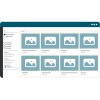
Hyland named a leader in Omdia report on DAM market Hyland's Nuxeo Platform for DAM was named a Leader in the DAM space in this 2023 report. The solution achieved the maximum score for advanced capabilities and solution breadth, and Omdia placed Hyland’s market momentum as above average for the field.
Key features of a DAM
To fully unlock the potential of a DAM, you must first gain a grasp of its powerful features. These features assist in elevating the management of your organization’s digital assets:
Central repository: Acts as a single source of truth for all digital assets, ensuring they are organized and accessible, thereby enhancing collaboration and asset discoverability.
Advanced search: Utilizes metadata and tagging to streamline asset retrieval and improve productivity.
Version control: Tracks changes to assets, providing a history of edits and updates to safeguard content integrity and facilitate collaborative workflows.
Access permissions: Uses granular access control mechanisms to secure assets by controlling who can view, edit and distribute them.
Integration capabilities: Seamlessly connects with other systems to enhance workflow efficiency, enable interoperability and extend functionality to meet specific business needs.
Metadata management: Allows users to assign descriptive tags, keywords and attributes to assets for efficient organization, categorization and retrieval — enhancing asset discoverability and usability.
Asset transformation: Enable users to convert, resize, optimize or format assets on-the-go, ensuring compatibility across different channels, devices and publishing platforms.
Workflow management: Streamlines asset workflows through automated processes, including approval cycles, asset routing, notifications and task assignments — improving efficiency and reducing manual intervention.
> Read more | 15 essential features of an advanced DAM system
Key features of a CMS
CMS features serve as a robust framework for creating, managing and publishing digital content across websites and other online platforms. Leverage these features to empower an organization to create, manage and optimize your online content effectively:
Content publishing: CMS platforms facilitate easy content creation, editing and publishing, allowing users to manage diverse content types such as articles, blog posts, images and multimedia seamlessly.
Templates and design: With customizable templates and design options, users can create visually appealing and responsive websites without the need for extensive coding knowledge, ensuring a consistent and professional online presence.
SEO optimization: Built-in tools and plugins allows users to optimize content for search engines by implementing meta tags, keywords, sitemaps and other SEO best practices — improving visibility and driving organic traffic.
User-friendly interface: Empowers users of all skill levels to manage and update website content effortlessly, enhancing productivity and reducing reliance on technical expertise.
Access control: Allows administrators to define user roles, permissions and content workflows to ensure data security, compliance and content integrity.
Multilingual support: Enables users to create and manage content in multiple languages, catering to diverse global audiences and enhancing user experience for international visitors.
Content versioning: Tracks changes to content over time, allowing users to revert to previous versions, track edits and collaborate on content creation effectively — ensuring content accuracy.
Mobile responsiveness: Websites adapt seamlessly to various screen sizes and devices, providing an optimal viewing experience for visitors accessing content on smartphones and tablets.
When to use DAM, CMS or both?
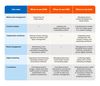
To determine which system suits your organization, it is essential to understand the platforms’ respective strengths and applications across various industries. This table showcases various use cases:
> Read more | The Omdia Universe: digital asset management report
Introducing Hyland Nuxeo
Hyland Nuxeo embodies the integration and efficiency between DAM and CMS solutions. It goes beyond traditional DAM and CMS platforms, offering a versatile framework that adapts to diverse content management needs and revolutionizes how organizations manage their digital content and assets.
At its core, Nuxeo provides a flexible and scalable platform equipped with advanced capabilities for content creation, collaboration, workflow automation and metadata management. It caters to a wide range of content types, including documents, images, videos and other rich media assets.
What sets Nuxeo apart is its ability to seamlessly integrate DAM functionalities within a robust content management framework. By leveraging its open architecture, organizations can extend Nuxeo's capabilities to tailor the platform to their specific needs, whether they require a comprehensive DAM solution, a versatile CMS for website content or a hybrid approach that combines the strengths of both.
With Nuxeo, organizations can break down silos between content types and departments, fostering collaboration and efficiency across the entire content lifecycle. Should you find yourself grappling with the challenges of managing digital assets, handling website content or looking for a solution that combines both, count on Nuxeo to be your steadfast companion throughout your digital content journey.
Striking a balance for effective digital asset and content management
The debate between DAM and CMS is not about choosing one over the other, but rather understanding their unique strengths and how they complement each other.
This is where platforms like Nuxeo come into play, offering the capabilities of DAM and CMS in a unified framework. By leveraging the strengths of these platforms and adopting a strategic approach to content management, organizations can optimize their workflows and deliver exceptional digital experiences to their audiences.

Article
Benefits of DAM in the cloud
Managing your assets in the cloud keeps you well positioned to meet the growing demands for content.

Article
The innovator's guide to strategic DAM replacement or consolidation
This guide will help digital asset management (DAM) leaders, CIOs and digital innovators evaluate if it’s time to begin a strategic replacement or consolidation initiative. It also includes 11 recommendations to consider in your next DAM evaluation.

Article
A beginner’s guide to DAM taxonomy
If you want your creative teams to produce their best work, then they need instant access to digital assets. But providing access to these materials is easier said than done. Not only do you need a centralized digital asset management system (DAM), but you also need a streamlined DAM taxonomy that classifies assets in a way that your users can understand. But what exactly is a DAM taxonomy?

Article
The ultimate guide to digital asset management (DAM) implementation
Explore how a successful DAM implementation enhances efficiency, streamlines workflows and unlocks the full potential of your digital assets.